
Linking Obsidian Sync to Github Pages Website
I want to have this website update in real time when I make updates to my codebase no matter where I am. This means on my personal computer, phone, or other device. Initially, this website was set up through github pages, and it is hosted by github as well, so the all my changes can be made on my computer and then pushed to github and they will show up on my static website after a few mins.
This was a great easy way to set up the website and understand how everything worked, but I’ve run into issues recently when trying to make changes on my phone. This friction has made me less likely to make any changes to my personal website since I knew I had to make many other changes in the back end later on before it updated.
github has a text editor on mobile that I tried to use to make changes to my website on mobile, but that was clunky and hard to use since it isn’t made for this. I then resorted to making posts on onenote and then copy pasting the post into a post on my github folder so it would show up in my website. However, the formatting didn’t transfer over well from the XML based text editing into the basic test format that is markdown, which added lots of extra work for me.
A coworker showed me obsidian and I began experimenting with it and discovered it was exactly what I wanted. It was built to edit markdown files natively, and can sync between multiple devices seamlessly. It saves files in a folder format on your computer which can also overlap with the folder you sync with github. Changes made on mobile can be immediately pushed to the github server where the website is hosted for a seamless experience from the user’s POV.
Additionally, any jupyter notebooks in the repo can be converted to markdown using the command python -m nbconvert "<your jupyter file name>" --to markdown. This translates the code blocks and existing markdown correctly and also runs the code and saves any images and adds the links to the images in the file. This can then be moved wherever it is needed.
Benefits:
- Easier integration of images into a post.
- Native .md file editing in Obsidian
- Instant sync between devices and easy push to jekyll website through github
- Open source community in Obsidian
- Many plugins with Obsidian
Details to set up below:
-
Set up an obsidian vault using the “from a folder” option
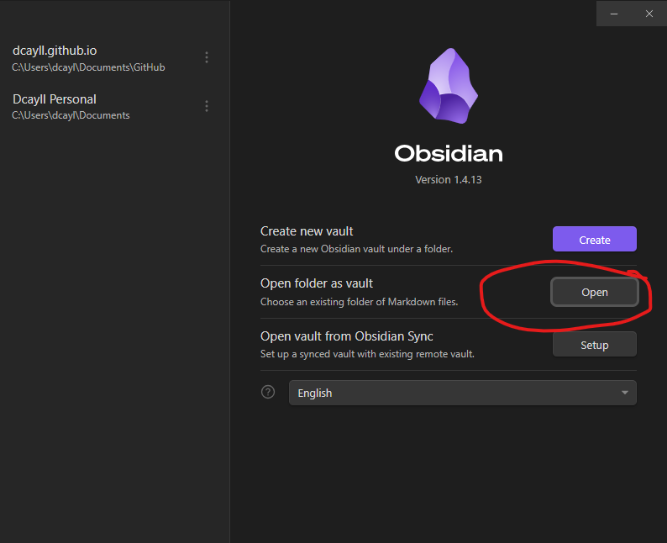
- Now your obsidian vault is the same as the file system used to update your Jekyll website
- Purchase and set up obsidian sync
- This option allows your obsidian notebook to sync between multiple devices. It happens nearly instantaneously and then the changes show up on your initial file system.
- Install the Obsidian git plugin to automatically push changes in the obsidian file system to github without having to open up github and push it yourself.
- This can be configured any way you want. I chose no automatic sync and to only sync using a hotkey whenever I choose.
Note: this note was written in obsidian on my computer and then pushed to my GitHub repo for my website.

Comments