<?xml version="1.0" encoding="utf-8"?><feed xmlns="http://www.w3.org/2005/Atom" ><generator uri="https://jekyllrb.com/" version="3.10.0">Jekyll</generator><link href="https://dcayll.github.io/feed.xml" rel="self" type="application/atom+xml" /><link href="https://dcayll.github.io/" rel="alternate" type="text/html" /><updated>2026-02-02T05:01:13+00:00</updated><id>https://dcayll.github.io/feed.xml</id><title type="html">David Cayll</title><subtitle>I&apos;m currently a PhD student at the Univeristy of Texas at Austin in the Nanoscale Design and Manufacturing lab. I&apos;m also working part time as an R&amp;D Engineer at GraphAudio inc, a small start-up based in Austin. In my spare time I enjoy being outdoors, riding motorcycles, lifting weights, practicing macro and astro photography, and learning about macro economics and monetary policy. This website is for organizing my random thoughts and hobbies, and hopefully these things may be helpful to others.</subtitle><author><name>David Cayll</name></author><entry><title type="html">Medical Student Debt Repayment Considerations</title><link href="https://dcayll.github.io/finances/money/Medical-Student-Debt-Strategy/" rel="alternate" type="text/html" title="Medical Student Debt Repayment Considerations" /><published>2024-06-29T00:00:00+00:00</published><updated>2024-06-29T00:00:00+00:00</updated><id>https://dcayll.github.io/finances/money/Medical-Student-Debt-Strategy</id><content type="html" xml:base="https://dcayll.github.io/finances/money/Medical-Student-Debt-Strategy/"><![CDATA[]]></content><author><name>David Cayll</name></author><category term="finances" /><category term="money" /><category term="finances" /><category term="money" /><category term="tax" /><summary type="html"><![CDATA[Repayment priorities and tax incentives when paying back medical debt and juggling other priorities]]></summary></entry><entry><title type="html">Small Business Tax Considerations</title><link href="https://dcayll.github.io/finances/money/Small-Business-Deductions/" rel="alternate" type="text/html" title="Small Business Tax Considerations" /><published>2024-01-21T00:00:00+00:00</published><updated>2024-01-21T00:00:00+00:00</updated><id>https://dcayll.github.io/finances/money/Small-Business-Deductions</id><content type="html" xml:base="https://dcayll.github.io/finances/money/Small-Business-Deductions/"><![CDATA[<h3 id="deducting-business-expenses">Deducting Business Expenses</h3>
<ul>
  <li>Typical income tax deductions are accounted for on the schedule A form for an individual’s tax return. This only makes sense if you have more than ~$13,850, or $27,700 for a married couple filing jointly (as of 2023) of expenses to deduct from your income.</li>
  <li>Business expenses can be deducted from taxable income as well. These deductions are taken into account through the schedule C tax form. Schedule C deductions are used as</li>
  <li>This means that an individual can take the standard deduction for personal expenses, but then further reduce their adjusted gross income (AGI) through schedule C deductions.</li>
  <li>Source: https://www.irs.gov/publications/p535
    <h3 id="pass-through-business-income">Pass through Business Income</h3>
  </li>
  <li>In addition to claiming deductions on business expenses, you can deduct 20% of qualified business income from your income tax form. This is only for pass-through businesses (businesses in which business income is taxed as regular personal income on an individual’s tax return.</li>
</ul>]]></content><author><name>David Cayll</name></author><category term="finances" /><category term="money" /><category term="finances" /><category term="money" /><category term="tax" /><summary type="html"><![CDATA[Compiled information on how business income and expenses affect personal tax filing]]></summary></entry><entry><title type="html">Linking Obsidian Sync to Github Pages Website</title><link href="https://dcayll.github.io/engineering/coding/Linking-Obsidian-Sync-to-github-pages-Website/" rel="alternate" type="text/html" title="Linking Obsidian Sync to Github Pages Website" /><published>2023-09-17T00:00:00+00:00</published><updated>2023-09-17T00:00:00+00:00</updated><id>https://dcayll.github.io/engineering/coding/Linking-Obsidian-Sync-to-github-pages-Website</id><content type="html" xml:base="https://dcayll.github.io/engineering/coding/Linking-Obsidian-Sync-to-github-pages-Website/"><![CDATA[<p>I want to have this website update in real time when I make updates to my codebase no matter where I am. This means on my personal computer, phone, or other device. Initially, this website was set up through github pages, and it is hosted by github as well, so the all my changes can be made on my computer and then pushed to github and they will show up on my static website after a few mins.</p>

<p>This was a great easy way to set up the website and understand how everything worked, but I’ve run into issues recently when trying to make changes on my phone. This friction has made me less likely to make any changes to my personal website since I knew I had to make many other changes in the back end later on before it updated.</p>

<p>github has a text editor on mobile that I tried to use to make changes to my website on mobile, but that was clunky and hard to use since it isn’t made for this. I then resorted to making posts on onenote and then copy pasting the post into a post on my github folder so it would show up in my website. However, the formatting didn’t transfer over well from the XML based text editing into the basic test format that is markdown, which added lots of extra work for me.</p>

<p>A coworker showed me obsidian and I began experimenting with it and discovered it was exactly what I wanted. It was built to edit markdown files natively, and can sync between multiple devices seamlessly. It saves files in a folder format on your computer which can also overlap with the folder you sync with github. Changes made on mobile can be immediately pushed to the github server where the website is hosted for a seamless experience from the user’s POV.</p>

<p>Additionally, any jupyter notebooks in the repo can be converted to markdown using the command <code class="language-plaintext highlighter-rouge">python -m nbconvert "&lt;your jupyter file name&gt;" --to markdown</code>. This translates the code blocks and existing markdown correctly and also runs the code and saves any images and adds the links to the images in the file. This can then be moved wherever it is needed.</p>

<p>Benefits:</p>
<ol>
  <li>Easier integration of images into a post.</li>
  <li>Native .md file editing in Obsidian</li>
  <li>Instant sync between devices and easy push to jekyll website through github</li>
  <li>Open source community in Obsidian</li>
  <li>Many plugins with Obsidian</li>
</ol>

<p>Details to set up below:</p>

<ol>
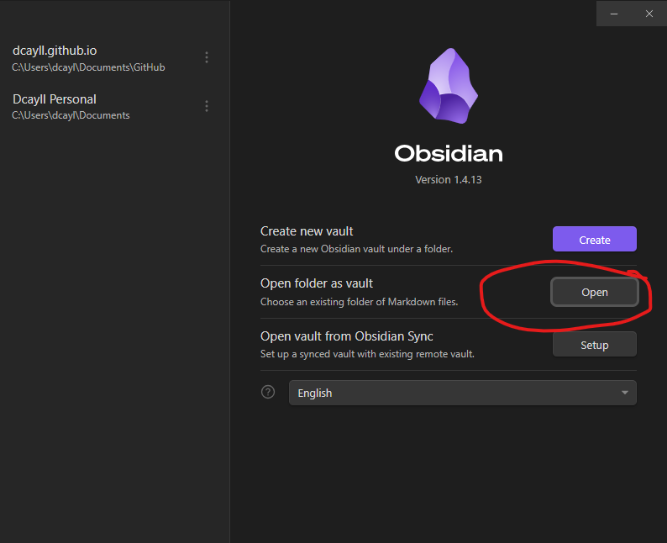
  <li>
    <p>Set up an obsidian vault using the “from a folder” option <img src="/assets/2023-09-17-Linking-Obsidian-Sync-to-github-pages-Website/2023-09-17-Linking-Obsidian-Sync-to-github-pages-Website-image-1.png" alt="png" /></p>

    <ol>
      <li>Now your obsidian vault is the same as the file system used to update your Jekyll website</li>
    </ol>
  </li>
  <li>Purchase and set up obsidian sync
    <ol>
      <li>This option allows your obsidian notebook to sync between multiple devices. It happens nearly instantaneously and then the changes show up on your initial file system.</li>
    </ol>
  </li>
  <li>Install the Obsidian git plugin to automatically push changes in the obsidian file system to github without having to open up github and push it yourself.
    <ol>
      <li>This can be configured any way you want. I chose no automatic sync and to only sync using a hotkey whenever I choose.</li>
    </ol>
  </li>
</ol>

<p><em>Note: this note was written in obsidian on my computer and then pushed to my GitHub repo for my website.</em></p>]]></content><author><name>David Cayll</name></author><category term="engineering" /><category term="coding" /><category term="Jekyll" /><category term="website" /><category term="coding" /><summary type="html"><![CDATA[Discussion and review of Obsidian- Jekyll website workflow]]></summary></entry><entry><title type="html">Orion Nebula</title><link href="https://dcayll.github.io/photography/astro/Orion-Nebula/" rel="alternate" type="text/html" title="Orion Nebula" /><published>2023-04-23T00:00:00+00:00</published><updated>2023-04-23T00:00:00+00:00</updated><id>https://dcayll.github.io/photography/astro/Orion-Nebula</id><content type="html" xml:base="https://dcayll.github.io/photography/astro/Orion-Nebula/"><![CDATA[<p>Camera Settings:</p>

<ul>
  <li>Star Tracker: Star Adventurer 2i</li>
  <li>Info: 30.00s f/6.3 ISO800</li>
  <li>Model: ILCE-6100</li>
  <li>Date taken: 1/15/2023 - 1:14:28 AM</li>
  <li>Lens model: E 55-210mm F4.5-6.3 OSS</li>
  <li>Focal length (mm): 210</li>
</ul>

<p>Original image:</p>

<p><img src="/assets/2023-04-23-Orion-Nebula/DSC05139.JPG" alt="jpg" /></p>

<p>Image with Black Point adjusted up to help with washed out look:</p>

<p><img src="/assets/2023-04-23-Orion-Nebula/2023-04-23-Orion-Nebula-image-1.jpg" alt="jpg" /></p>

<p>Image of images stacked in DeepSkyStacker:</p>

<p>screenshot added in: 
<img src="/assets/2023-04-23-Orion-Nebula/2023-04-23-Orion-Nebula-image-2.png" alt="png" /></p>]]></content><author><name>David Cayll</name></author><category term="photography" /><category term="astro" /><category term="Astro" /><category term="Photography" /><summary type="html"><![CDATA[Shooting Orion Nebula and editing image]]></summary></entry><entry><title type="html">Life as a Game of Chess</title><link href="https://dcayll.github.io/faith/Life-as-a-Game-of-Chess/" rel="alternate" type="text/html" title="Life as a Game of Chess" /><published>2023-04-19T00:00:00+00:00</published><updated>2023-04-19T00:00:00+00:00</updated><id>https://dcayll.github.io/faith/Life-as-a-Game-of-Chess</id><content type="html" xml:base="https://dcayll.github.io/faith/Life-as-a-Game-of-Chess/"><![CDATA[<p>Imagine I’m a knight in a chess game. I don’t know the rules of chess or even the whole board in the beginning. It’s like the life sized game in Harry Potter. In life I’m trying to figure out how I’m supposed to move. I try different things but it’s hard to find the way im supposed to move. I try moving straight and diagonally but I keep hitting a wall and im not allowed to move like that. Just like in life, when we’re young we’re trying to find our gifts and our callings. We move but we end up getting pushed back to where we started because our knight isn’t built to move like a rook or a bishop. We also don’t have full view of the whole chess board (no single game piece does). Only the grandmaster playing the chess game does (God). Our job early in life is to figure out the move best suited for us (an “L” as a knight in this chess analogy). In reality this is us finding and refining our God given gifts. How can I impact the world in a way that only I can? How can I move in my local chess board based on the pieces that are around me that I have virtually no control over? How can I move while maximizing the satisfaction of my moves?</p>

<p>Eventually we learn our move in the grand chess game. But we still don’t have full view of the board still, only God does. We can see only one move ahead of us (maybe 2), and even then, just the pieces surrounding us. We don’t have the ability to see past the pieces around us and anticipate 2 or 3 or 10 moves ahead. We must put our trust in God that he is a grandmaster and is moving the game forward in our view as well as outside of it and that he is setting up the moves for our game pieces that will help us win the game. As the game moves forward, we move based on the moves we figured out early on (“L”). We get better and better at figuring out what to do in the board around us. As we move through the board, we see more and more of it and begin to understand the grandmasters plan a little more, bit by bit, by witnessing other moves happening around us. God acts around us and through us, using our gifts to set up our next move and the moves of the pieces around us as well. It is our responsibility to perform like the best knight possible so that we can set up the other pieces around us for ultimate victory. The grand master sets up assists for us to create opportunities for others, and sometimes he must sacrifice pieces in order to create a greater play somewhere else.</p>

<p>Victory in this game of chess is the final goal. All the pieces want to win. We’re all on the same team. The grandmaster also wants to win. Victory is eternal life, eternal joy and deep fulfillment. The fulfillment of knowing that the moves you made contributed to ultimate victory in our game. Victory is love and willing the good of the other throughout the game. Fulfilling your duties as a knight so that you can set up small victories for those around you who will ultimately also improve your local game board so that you can create even greater success, all based on the grandmaster’s game plan.</p>

<p>Some people may want to play so that they can win locally. They may assume it is them against the whole rest of the chess board and lack the high level vision of the game that the grandmaster has. And maybe they do show some local victories against those pieces around them. However, without working in concert with the other pieces around the board, ultimate victory can not be won. Your knight can be the winner of one corner of the chess board, but ultimately, that is where the knight will stay. Greater victory only comes from working in concert with the grandmaster and with the other pieces around you.</p>

<p>And this view of the game may even be logical. Maybe you’re a pawn that has bad placement and will be sacrificed early. Why not try to go out with a bang and try to win locally as fast as possible? Because the underlying assumption of the game of chess is that you want the player to win. If you and all the game pieces around you play to the best of your ability, then victory in the end is much more likely. If you don’t have the underlying assumption of the game as overall victory for the grandmaster and you have comfort or local victory as your goal, the thing that is lost is the ultimate fulfillment of your duty as a knight or pawn or whatever your game piece is. Ultimate satisfaction, or “justification” in theological terms, comes from the knowledge that you fulfilled your destiny to the best of your ability. You didn’t settle for comfort or the path of least resistance. You fought hard to figure out what game piece you are and figured out the best way to move, and then you used that knowledge to improve the game board around you so that you and those around you can also contribute maximally towards ultimate victory for the grandmaster.</p>

<p>Not enough people go through the tough work of figuring out how your piece is supposed to move. Most just fumble around and trick themselves into comfort and inaction. It’s easier to make plans and imagine how the game will play out instead of bumping into the walls and and following the movement pattern that the game architect has created for you (the fully formed knight sure in his L-shaped move trajectory).</p>

<p>And of those who figurine out their move, the ones who use the moves they learned (through lots of trial and error) for ultimate victory instead of local victory or improving the local game board for their own benefit is even less. It takes a high level view of the world as a chess board to make this step. It requires some amount of faith and trust in a higher power.</p>

<p>You can personally see this analogy in one of two ways: ultimate insignificance or extreme significance. On one hand, you are just a pawn playing the table around you without much effect on the game around you. You’re stuck seeing that you can’t affect change around you much at all. Which makes sense if you only take the view of the pieces around you. On the other hand, you can take the view that even small moves you make can have massive implications on the game around you and even areas of the game board completely unobservable to you. Small things you do, kind words, thoughtful gestures can cause significant ripple effects to those around you and you can choose to see your life on the whole game board level as having extreme significance.</p>

<p>You can also see the negative side of this. Criminals can have huge affects on the world around them. They ruin entire lives and entire families around them. Small actions have ripple effects. In the positive and the negative. All of this comes from gaining greater perspective of the world around you and the game board we’re all sitting on.</p>]]></content><author><name>David Cayll</name></author><category term="faith" /><category term="faith" /><summary type="html"><![CDATA[Meditations on free will and predestination]]></summary></entry><entry><title type="html">Creating Thumbnails</title><link href="https://dcayll.github.io/photo-editing/creating-thumbnails/" rel="alternate" type="text/html" title="Creating Thumbnails" /><published>2023-02-05T00:00:00+00:00</published><updated>2023-02-05T00:00:00+00:00</updated><id>https://dcayll.github.io/photo-editing/creating-thumbnails</id><content type="html" xml:base="https://dcayll.github.io/photo-editing/creating-thumbnails/"><![CDATA[<p>To create a thumbnail in GIMP:</p>

<ol>
  <li>Find .jpg for the thumbnail</li>
  <li>Open the image in GIMP by dragging the file into the toolbox</li>
  <li>Use the scale tool to change the size of the image to the critical dimension
    <ul>
      <li>Press “Scale” when finished</li>
    </ul>
  </li>
  <li>Right click the layer on which the image exists (should be the only layer)
    <ul>
      <li>select “Layer Boundary Size”</li>
    </ul>
  </li>
  <li>In the pop-up window, set the size of the thumbnail under “Layer Size”
    <ul>
      <li>Select “Center” in the Offset menu</li>
      <li>Press “Resize” to finish</li>
    </ul>
  </li>
  <li>Click and drag the layer into the toolbox to open it in its own tab</li>
  <li>Select File-&gt;Export As
    <ul>
      <li>name the file and set extension as .png so that the extra space around the thumbnail is blank instead of filled with the background color.</li>
    </ul>
  </li>
</ol>

<p>Sources: 
<a href="https://daviesmediadesign.com/how-to-export-single-layers-as-images-from-gimp/" target="_blank">https://daviesmediadesign.com/how-to-export-single-layers-as-images-from-gimp/</a></p>]]></content><author><name>David Cayll</name></author><category term="photo-editing" /><category term="GIMP" /><summary type="html"><![CDATA[Using GIMP to create small preview images]]></summary></entry><entry><title type="html">83(b) Tax form - why you should fill it out on time</title><link href="https://dcayll.github.io/engineering/83b-tax-form/" rel="alternate" type="text/html" title="83(b) Tax form - why you should fill it out on time" /><published>2022-11-12T19:34:30+00:00</published><updated>2022-11-12T19:34:30+00:00</updated><id>https://dcayll.github.io/engineering/83b-tax-form</id><content type="html" xml:base="https://dcayll.github.io/engineering/83b-tax-form/"><![CDATA[<h1 id="83b-tax-form-why-you-should-do-it-on-time">83(b) tax form. Why you should do it on time.</h1>

<p>The 83(b) form tax form should be filled out within 30 days of receiving a stock grant consisting of restricted stock units which will vest over time. The form allows you to keep the cost basis of your grant the same as when you were granted the stock at the end of the vesting period. The most tax efficient way to vest shares of stock.</p>

<p>It is not necessary that one fill out the tax form, it is only of benefit to the grantee. Refer to the following example:</p>

<hr />
<p>5,000 shares of Example LLC Stock is granted to an individual on Jan 1st. 2020 at a price of \$0.001 per share on a 4 year vesting schedule. This means the total purchase price is \$5.00, which is either paid or deducted from employee’s pay. The vesting schedule releases 1/4th of the stock after the first year, and then 1/48th of the stock vests every month thereafter until the full amount is reached in 4 years.</p>

<div class="language-python highlighter-rouge"><div class="highlight"><pre class="highlight"><code><span class="kn">import</span> <span class="nn">matplotlib.pyplot</span> <span class="k">as</span> <span class="n">plt</span>
<span class="kn">import</span> <span class="nn">pandas</span> <span class="k">as</span> <span class="n">pd</span>
<span class="kn">import</span> <span class="nn">numpy</span> <span class="k">as</span> <span class="n">np</span>
<span class="kn">import</span> <span class="nn">math</span>

<span class="n">s_grant</span> <span class="o">=</span> <span class="mf">0.001</span> <span class="c1"># stock price on date of grant
</span><span class="n">n</span> <span class="o">=</span> <span class="mi">5000</span> <span class="c1"># number of granted shares
</span><span class="n">total_granted</span> <span class="o">=</span> <span class="n">s_grant</span> <span class="o">*</span> <span class="n">n</span> <span class="c1"># total price of stock at grant date
</span>
<span class="k">print</span><span class="p">(</span><span class="s">"Total purchase price: $%0.2f"</span> <span class="o">%</span> <span class="p">(</span><span class="n">total_granted</span><span class="p">))</span>
</code></pre></div></div>

<div class="language-plaintext highlighter-rouge"><div class="highlight"><pre class="highlight"><code>Total purchase price: $5.00
</code></pre></div></div>

<h2 id="83b-form-on-time">83(b) form on time</h2>

<p>In the scenario that you submitted the 83(b) form on time, the total purchase price is the cost basis of your stock purchase, and you won’t have any capital gains while the stock vests. This means that you will not have to pay taxes over the years while your stock vests, and your only taxable income comes when you sell the stock and realize gains or losses.</p>

<p>For example, you wait until Jan 1st. 2024 when your stock is fully vested. After some fundraising and increase in company valuation, the price of the stock is now \$1,000 per share, which is a 1,000,000x gain. Not bad!</p>

<div class="language-python highlighter-rouge"><div class="highlight"><pre class="highlight"><code><span class="n">s_sale</span> <span class="o">=</span> <span class="mi">1000</span> <span class="c1"># price at sale
</span><span class="n">total_sold</span> <span class="o">=</span> <span class="n">s_sale</span> <span class="o">*</span> <span class="n">n</span> <span class="c1"># total value of stock when sold
</span>
<span class="k">print</span><span class="p">(</span><span class="s">"Total amount of stock sale: ${:,}"</span><span class="p">.</span><span class="nb">format</span><span class="p">(</span><span class="n">total_sold</span><span class="p">))</span>
</code></pre></div></div>

<div class="language-plaintext highlighter-rouge"><div class="highlight"><pre class="highlight"><code>Total amount of stock sale: $5,000,000
</code></pre></div></div>

<p>The 5,000 shares of stock are now worth \$5M total. When you sell your stock on Jan 1st, 2024, your cost basis is still \$0.001 since you haven’t been forced to pay for the stock as it vests, so you will pay the capital gains tax on the final sale amount. The following assumes long term capital gains for the first 3 years and short term gains for the last year as well as no change in valuation over the 4 years of vesting.</p>

<div class="language-python highlighter-rouge"><div class="highlight"><pre class="highlight"><code><span class="n">cg_short</span> <span class="o">=</span> <span class="mf">0.4</span> <span class="c1"># Short term capital gains rate
</span><span class="n">cg_long</span> <span class="o">=</span> <span class="mf">0.2</span> <span class="c1"># long term capital gains rate
</span>
<span class="n">gains</span> <span class="o">=</span> <span class="n">total_sold</span> <span class="o">-</span> <span class="n">total_granted</span> <span class="c1"># total capital gains on increased company valuation
</span>
<span class="n">gains_short</span> <span class="o">=</span> <span class="n">gains</span> <span class="o">*</span> <span class="mf">0.25</span> <span class="c1"># total gains subject to short term gains tax
</span><span class="n">gains_long</span> <span class="o">=</span> <span class="n">gains</span> <span class="o">*</span> <span class="mf">0.75</span> <span class="c1"># total gains subject to long term gains tax
</span>
<span class="n">taxes</span> <span class="o">=</span> <span class="n">gains_short</span><span class="o">*</span><span class="n">cg_short</span> <span class="o">+</span> <span class="n">gains_long</span><span class="o">*</span><span class="n">cg_long</span> <span class="c1"># total taxes levied
</span><span class="n">tax_rate</span> <span class="o">=</span> <span class="n">taxes</span><span class="o">/</span><span class="n">gains</span><span class="o">*</span><span class="mi">100</span> <span class="c1"># effective tax rate based on 1 year short term gains and 3 years long term gains. 
</span>
<span class="k">print</span><span class="p">(</span><span class="s">"Tax burden of ${:,} on a capital gain of ${:,} for a {:0.2f} % tax rate"</span><span class="p">.</span><span class="nb">format</span><span class="p">(</span><span class="n">taxes</span><span class="p">,</span> <span class="n">gains</span><span class="p">,</span> <span class="n">tax_rate</span><span class="p">))</span>
</code></pre></div></div>

<div class="language-plaintext highlighter-rouge"><div class="highlight"><pre class="highlight"><code>Tax burden of $1,249,998.75 on a capital gain of $4,999,995.0 for a 25.00 % tax rate
</code></pre></div></div>

<h2 id="83b-form-not-on-time">83(b) form not on time</h2>

<p>In this scenario, the individual doesn’t submit the 83(b) form, which means the stock will vest accoridng to the schedule and the value of the stock will count as income yearly, and will be taxed every year as short term capital gains. A number of assumptions are required for this calculation:</p>
<ul>
  <li>Company value is not changing over the course of vesting</li>
  <li>Marginal income tax rate is set at 24% (for income between \$95,375 - \$182,100 for a single filer in 2023: <a href="https://taxfoundation.org/publications/federal-tax-rates-and-tax-brackets/">source</a>)</li>
</ul>

<div class="language-python highlighter-rouge"><div class="highlight"><pre class="highlight"><code><span class="n">marginal_income_taxRate</span> <span class="o">=</span> <span class="mf">0.24</span>

<span class="n">ones</span> <span class="o">=</span> <span class="n">np</span><span class="p">.</span><span class="n">ones</span><span class="p">(</span><span class="mi">36</span><span class="p">)</span><span class="o">*</span><span class="mi">1</span><span class="o">/</span><span class="mi">48</span>
<span class="n">vesting_schedule_full</span> <span class="o">=</span> <span class="n">np</span><span class="p">.</span><span class="n">concatenate</span><span class="p">(([</span><span class="mf">0.25</span><span class="p">],</span> <span class="n">ones</span><span class="p">))</span>
<span class="n">vesting_schedule_simplified</span> <span class="o">=</span> <span class="n">np</span><span class="p">.</span><span class="n">ones</span><span class="p">(</span><span class="mi">4</span><span class="p">)</span><span class="o">*</span><span class="mf">0.25</span> <span class="c1"># % of total stock grant vested per year
</span><span class="n">yearly_vest</span> <span class="o">=</span> <span class="n">vesting_schedule_simplified</span> <span class="o">*</span> <span class="n">n</span> <span class="c1"># shares of stock granted per year
</span><span class="n">yearly_vest_income</span> <span class="o">=</span> <span class="n">yearly_vest</span> <span class="o">*</span> <span class="n">s_sale</span> <span class="c1"># value of stock granted per year assuming stock price s_sale
</span><span class="n">yearly_vest_income_tax</span> <span class="o">=</span> <span class="n">yearly_vest_income</span> <span class="o">*</span> <span class="n">marginal_income_taxRate</span> <span class="c1"># income tax paid yearly on vested stock
</span>
<span class="n">taxes</span> <span class="o">=</span> <span class="nb">sum</span><span class="p">(</span><span class="n">yearly_vest_income_tax</span><span class="p">)</span>
<span class="n">tax_rate</span> <span class="o">=</span> <span class="n">taxes</span><span class="o">/</span><span class="n">gains</span><span class="o">*</span><span class="mi">100</span>

<span class="k">print</span><span class="p">(</span><span class="s">"Tax burden of ${:,} on a capital gain of ${:,} for a {:0.2f} % tax rate"</span><span class="p">.</span><span class="nb">format</span><span class="p">(</span><span class="n">taxes</span><span class="p">,</span> <span class="n">gains</span><span class="p">,</span> <span class="n">tax_rate</span><span class="p">))</span>
</code></pre></div></div>

<div class="language-plaintext highlighter-rouge"><div class="highlight"><pre class="highlight"><code>Tax burden of $1,200,000.0 on a capital gain of $4,999,995.0 for a 24.00 % tax rate
</code></pre></div></div>

<p>Allowing the stock to vest in this way and getting taxed yearly is not inherently better or worse for all individuals. The most tax advantaged way to realize these gains depends on your marginal income tax bracket as well as your cash on hand. If your income tax bracket is lower than the long term gains tax (20%), then it may make sense to take the stock grants as income yearly. However, this means that you must have cash on hand to pay the taxes on the stock as it is granted. This would mean that you have to sell a portion of the stock to pay the taxes on it.</p>

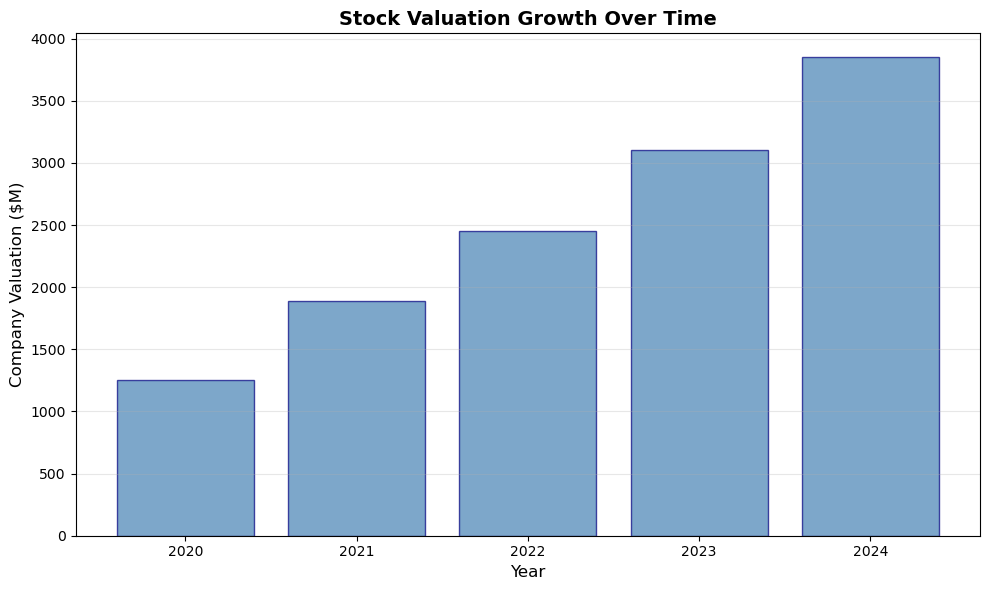
<p>Additionally, the real world doesn’t behave like the assumptions we made in the previous analysis. Stock prices change as valuations change, and this will change the tax optimal way to realize these gains. Below we will investigate the effects of an increasing stock price on the tax burden with and without the 83(b) form.</p>

<div class="language-python highlighter-rouge"><div class="highlight"><pre class="highlight"><code><span class="kn">import</span> <span class="nn">matplotlib.pyplot</span> <span class="k">as</span> <span class="n">plt</span>

<span class="c1"># Sample bar chart with dummy data
</span><span class="n">categories</span> <span class="o">=</span> <span class="p">[</span><span class="s">'2020'</span><span class="p">,</span> <span class="s">'2021'</span><span class="p">,</span> <span class="s">'2022'</span><span class="p">,</span> <span class="s">'2023'</span><span class="p">,</span> <span class="s">'2024'</span><span class="p">]</span>
<span class="n">values</span> <span class="o">=</span> <span class="p">[</span><span class="mi">1250</span><span class="p">,</span> <span class="mi">1890</span><span class="p">,</span> <span class="mi">2450</span><span class="p">,</span> <span class="mi">3100</span><span class="p">,</span> <span class="mi">3850</span><span class="p">]</span>

<span class="n">plt</span><span class="p">.</span><span class="n">figure</span><span class="p">(</span><span class="n">figsize</span><span class="o">=</span><span class="p">(</span><span class="mi">10</span><span class="p">,</span> <span class="mi">6</span><span class="p">))</span>
<span class="n">plt</span><span class="p">.</span><span class="n">bar</span><span class="p">(</span><span class="n">categories</span><span class="p">,</span> <span class="n">values</span><span class="p">,</span> <span class="n">color</span><span class="o">=</span><span class="s">'steelblue'</span><span class="p">,</span> <span class="n">edgecolor</span><span class="o">=</span><span class="s">'navy'</span><span class="p">,</span> <span class="n">alpha</span><span class="o">=</span><span class="mf">0.7</span><span class="p">)</span>
<span class="n">plt</span><span class="p">.</span><span class="n">xlabel</span><span class="p">(</span><span class="s">'Year'</span><span class="p">,</span> <span class="n">fontsize</span><span class="o">=</span><span class="mi">12</span><span class="p">)</span>
<span class="n">plt</span><span class="p">.</span><span class="n">ylabel</span><span class="p">(</span><span class="s">'Company Valuation ($M)'</span><span class="p">,</span> <span class="n">fontsize</span><span class="o">=</span><span class="mi">12</span><span class="p">)</span>
<span class="n">plt</span><span class="p">.</span><span class="n">title</span><span class="p">(</span><span class="s">'Stock Valuation Growth Over Time'</span><span class="p">,</span> <span class="n">fontsize</span><span class="o">=</span><span class="mi">14</span><span class="p">,</span> <span class="n">fontweight</span><span class="o">=</span><span class="s">'bold'</span><span class="p">)</span>
<span class="n">plt</span><span class="p">.</span><span class="n">grid</span><span class="p">(</span><span class="n">axis</span><span class="o">=</span><span class="s">'y'</span><span class="p">,</span> <span class="n">alpha</span><span class="o">=</span><span class="mf">0.3</span><span class="p">)</span>
<span class="n">plt</span><span class="p">.</span><span class="n">tight_layout</span><span class="p">()</span>
<span class="n">plt</span><span class="p">.</span><span class="n">show</span><span class="p">()</span>
</code></pre></div></div>

<p><img src="/assets/2022-11-12-83b-tax-form/2022-11-12-83b-tax-form-image-1.png" alt="" /></p>

<p>get into next:</p>
<ul>
  <li>chosing grant price, then sale price, and then a linarly variable price over the 4 years (potentially closest to reality). then also choose parabolic valuation increase as “best case” scenario</li>
  <li>calculate with 1/48th granting schedule, not just every year.</li>
</ul>

<p>Additional Resources:</p>
<ul>
  <li><a href="https://accountalent.com/868-2/">accountalent</a></li>
  <li><a href="https://www.aicpa.org/news/article/what-to-do-for-a-missed-sec-83-b-election">Association of International Certified Processional Accountants</a></li>
  <li><a href="https://www.fidelity.com/bin-public/060_www_fidelity_com/documents/customer-service/instructions-for-completing-irs-section-83b.pdf">fidelity 83(b) filling instructions</a></li>
</ul>]]></content><author><name>David Cayll</name></author><category term="engineering" /><category term="Finances" /><category term="Money" /><category term="Startup" /><category term="calculations" /><category term="simulation" /><category term="jupyter" /><summary type="html"><![CDATA[Discussion and Calculations on consequences of not filling out 83(b) tax form when granted shares of stock]]></summary></entry><entry><title type="html">Notes on creating masks for MEMS devices on klayout</title><link href="https://dcayll.github.io/engineering/klayout-masks/" rel="alternate" type="text/html" title="Notes on creating masks for MEMS devices on klayout" /><published>2022-11-03T00:00:00+00:00</published><updated>2022-11-03T00:00:00+00:00</updated><id>https://dcayll.github.io/engineering/klayout-masks</id><content type="html" xml:base="https://dcayll.github.io/engineering/klayout-masks/"><![CDATA[<p>This post is to describe how to perform certain tasks in klayout to create photolithography masks for ultrasonic sensors for my Ph.D.</p>

<h2 id="to-create-a-hexagonal-array">To create a hexagonal array:</h2>
<ol>
  <li>Create a cell with a pcell array of 2 circles and space them out according to the geometry required to create a hexagonal array. Refer to excel sheet for dimensions.</li>
  <li>Create an array of the above pcell array to fill the backplate. refer to the excel doc for spacing of this array.</li>
  <li>center the array of holes with the backplate circle using align tool. Make sure you’re on the level of the array of holes, then select both the array and the backplate circle.
edit -&gt; selection -&gt; align and then center for x and y direction.</li>
  <li>Once all possible circles and spacings are determined, flatten all of the “SubHole” circles.
    <ul>
      <li>Copy the base cell just in case it gets deleted.</li>
      <li>The level you are at when you do this matters. Flatten when at the array of subHoles (level 1)</li>
    </ul>
  </li>
  <li>Now that the subholes are flattened, they can be subtracted from a larger circle to create the backplate.
    <ul>
      <li>First select the large backplate circle, then all the smaller circles</li>
      <li>Next, select edit -&gt; selction -&gt; first into inside/ outside others</li>
      <li>this will create an outline object and then also the individual hole</li>
    </ul>
  </li>
  <li>Next, use the search and replace tool to find partial circles and remove them from the circle array. Find objects that have less area than what would be expected for a full circle.</li>
</ol>

<h2 id="for-alignment-of-things-to-arbitrary-origin">For alignment of things to arbitrary origin</h2>
<ol>
  <li>Start with cell centered around origin</li>
  <li>Place in the general location the final cell will be at</li>
  <li>Then subtract levels until you see the cell you just added and double click it to see the location</li>
  <li>From there, set the exact location it should be at
    <ul>
      <li>Note the location of the cell. It will be necessary for the next step</li>
    </ul>
  </li>
  <li>Go back to the original cell, use “edit -&gt; selection -&gt; move to” and input the location noted in the previous step</li>
  <li>Now return to the overarching cell where the subcell is pasted into and move the smaller cell into the origin, and the alignment should be perfect with the subcell origin at the origin of the overarching cell</li>
  <li>This can be repeated for all cells in an overarching cell, as long as it makes sense to use a single origin for all of them</li>
</ol>

<h2 id="random-notes">Random Notes:</h2>
<ul>
  <li>Search and replace feature doesn’t accept expressions. you must compute the area or perimeter you’d like to search for and type in the number.</li>
</ul>]]></content><author><name>David Cayll</name></author><category term="engineering" /><category term="klayout" /><category term="photolithography-masks" /><category term="MEMS" /></entry><entry><title type="html">Fixing flyaway hairs</title><link href="https://dcayll.github.io/photography/editing/Fixing-flyaway-hairs/" rel="alternate" type="text/html" title="Fixing flyaway hairs" /><published>2022-10-24T00:00:00+00:00</published><updated>2022-10-24T00:00:00+00:00</updated><id>https://dcayll.github.io/photography/editing/Fixing-flyaway-hairs</id><content type="html" xml:base="https://dcayll.github.io/photography/editing/Fixing-flyaway-hairs/"><![CDATA[<p>To remove hairs, the two most important tools are the “heal tool” for blending pixels together, and under the same menu is the “clone tool”, which actually copies and pastes pixels from the target area onto the touched up area. The heal tool is good for small things, while the clone tool is better for areas with thicker hairs because it doesn’t average with the pixels that used to be hair.</p>]]></content><author><name>David Cayll</name></author><category term="photography" /><category term="editing" /><category term="GIMP" /><summary type="html"><![CDATA[Removing pesky flyaway hairs using GIMP]]></summary></entry><entry><title type="html">Echeveria Succulent Timelapse</title><link href="https://dcayll.github.io/photography/macro/Echeveria-Succulent-timelapse/" rel="alternate" type="text/html" title="Echeveria Succulent Timelapse" /><published>2022-10-23T00:00:00+00:00</published><updated>2022-10-23T00:00:00+00:00</updated><id>https://dcayll.github.io/photography/macro/Echeveria-Succulent-timelapse</id><content type="html" xml:base="https://dcayll.github.io/photography/macro/Echeveria-Succulent-timelapse/"><![CDATA[<p>Text about how the photos were taken and how the post processing was performed to create the gif.</p>

<p>photo of camera on tripod</p>

<p>gallery of multiple stills as it grows</p>

<p>summary of pocessing in GIMP</p>

<p>description of software for making the gif and lining up all the images</p>

<p>link to instagram of it</p>]]></content><author><name>David Cayll</name></author><category term="photography" /><category term="macro" /><category term="Succulent" /><category term="photography" /><summary type="html"><![CDATA[The making of a time lapse of the growth of an Echeveria Succulent from a single leaf.]]></summary></entry></feed>